Elevate Your Portfolio with an A5 Minimalist Notebook Mockup
In the world of design, presentation is everything. You could have crafted the most stunning cover art, the most intricate pattern, or the most elegant logo, but if it’s presented on a flat, lifeless canvas, it loses its impact. Clients and audiences want to see how designs function in the real world. They need to visualize the tactile experience of holding a product. This is precisely where the A5 Minimalist Notebook Mockup becomes an indispensable asset in your toolkit. It is not just a digital file; it is a bridge between your digital concept and a physical reality.
The Power of Realistic Presentation
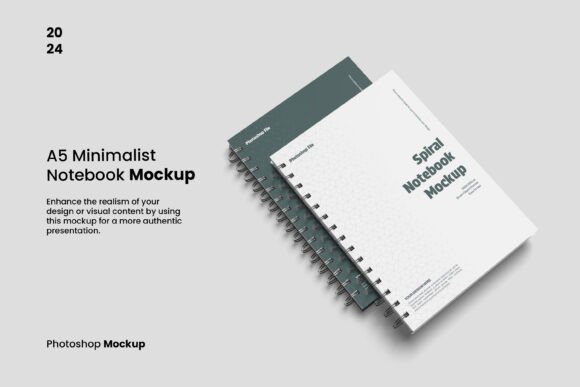
The A5 format is ubiquitous in the stationery world. It is the gold standard for personal journals, corporate planners, and indie brand releases. However, creating a physical prototype for every revision is expensive and time-consuming. By utilizing a high-quality mockup, you simulate that physical presence instantly. The "minimalist" aspect of this specific mockup is key. It strips away distracting backgrounds and complex environments, focusing the viewer's eye entirely on your work. This creates a sophisticated, clean aesthetic that appeals to modern sensibilities. Whether you are a graphic designer showcasing a new font pairing or an entrepreneur testing packaging design, the clean slate ensures your design is the hero.
- Visual Clarity: The clean environment eliminates noise, allowing for better evaluation of typography and layout.
- Professionalism: Sending a client a realistic 3D rendering looks infinitely more professional than a flat JPEG on a white background.
- Emotional Connection: Seeing a notebook with a shadow and a curve helps the viewer imagine writing in it, creating an emotional hook.
Streamlining Your Workflow with Smart Objects
Time is the most valuable currency for creative professionals. The technical barrier between a finished design and a final presentation file can often cause bottlenecks. This is why the A5 Minimalist Notebook Mockup is built around the smart-object feature. For those unfamiliar, a smart object acts as a container within Photoshop that holds source content. In this context, it means you can place your artwork into a specific layer, and the software automatically applies the necessary perspective, lighting, and distortion to make it look like it is printed on the notebook cover.
The workflow is incredibly efficient. You simply double-click the smart layer, paste your design, save, and return to the main file. In seconds, your flat artwork transforms into a realistic product shot. This efficiency is vital when you are working on brand identity projects where you need to show consistency across multiple deliverables. Imagine presenting a client with a series of ten different notebook designs for their corporate gifting program. Without a mockup, this would take hours of manual warping and shading. With this file, it takes minutes.
Technical Specifications for High-Fidelity Output
Quality matters, especially when your work is viewed on high-resolution Retina displays or printed for lookbooks. The A5 Minimalist Notebook Mockup is engineered for high fidelity, boasting dimensions of 3000 x 2000 pixels at 300 DPI. This ensures that your final output is crisp, sharp, and suitable for both digital portfolios and print materials.
Furthermore, the flexibility of the file structure allows for deep customization. You are not locked into a specific aesthetic. The feature of fully separated objects means you have granular control over every element in the scene. You can adjust the lighting, move the notebook, or even isolate the shadow for better compositing.
- Resolution: 3000 x 2000 pixels provides ample space for cropping and close-up detail shots.
- Color Depth: 300 DPI ensures print-ready quality.
- Background Control: You have the option to change the background color or make it transparent. This is crucial for designers who need to place the mockup into existing web layouts or brochures with specific color palettes.
Practical Applications Across Industries
The versatility of this mockup extends far beyond simple portfolio display. It is a robust tool for various stages of the creative and commercial process.
For Brand Strategists and Identity Designers:
When building a brand identity, consistency is paramount. You can use the A5 Minimalist Notebook Mockup to demonstrate how a logo works on a tangible product. It helps clients visualize their brand in the hands of their customers. It is perfect for showing off logo design applications without needing to hire a photographer and buy props.
For Publishers and Content Creators:
If you are an author or a publisher planning a limited edition release, this mockup allows you to test cover designs. You can evaluate how different serif fonts or sans serif fonts hold up against the texture of the notebook cover. It is also excellent for creating promotional graphics for social media. A realistic image of a notebook generates much higher engagement on platforms like Instagram and Pinterest than a static image of a book cover.
For E-commerce and Packaging:
Small business owners selling stationery on Etsy or Shopify can use these mockups to create product listings before the physical stock even arrives. This allows for pre-sales and marketing campaigns to launch simultaneously with production. It serves as a cost-effective alternative to packaging design photography.
Design Considerations and Typography
When placing your work into the A5 Minimalist Notebook Mockup, pay close attention to how your typography interacts with the simulated surface. A minimalist background tests your design's strength. If your layout relies on a busy background to look good, it might not be a strong design.
Consider the hierarchy of your elements. Does the title pop? Is the font pairing legible at the A5 scale? This mockup allows you to stress-test your modern typography. For instance, if you are using a script font or a handwritten font, viewing it on a mockup helps you see if the strokes are too thin to be reproduced in print. Conversely, a bold display font might look striking on the cover, and the mockup will show you exactly how that weight translates to a physical object.
The instruction file included with the download is a valuable resource. It guides you through the nuances of the specific shadows and highlights used in the file. Understanding these layers allows you to tweak the realism. Perhaps you want a softer shadow for a dreamy aesthetic, or a harder shadow for a corporate look. The separated objects give you that freedom.
Evaluating Fit and Final Polish
Before finalizing your design, use the mockup to evaluate the fit. Does your design bleed off the edge intentionally? Does the spine text align correctly? These are details that are often missed in flat digital proofs but become glaringly obvious in a 3D mockup.
Remember that the images and templates in the preview are not included; this is a shell for your own creativity. Treat this file as a stage. Your design is the actor. By adjusting the background color to complement or contrast with your notebook cover, you create a cohesive composition that tells a visual story.
In conclusion, the A5 Minimalist Notebook Mockup is more than just a digital asset; it is a strategic tool for validation and presentation. It empowers designers, marketers, and entrepreneurs to present their ideas with the weight and reality they deserve. By leveraging its high-resolution capabilities and smart-object efficiency, you elevate your work from a concept to a tangible product ready for the market. It is an essential component for anyone serious about their visual communication and commercial font