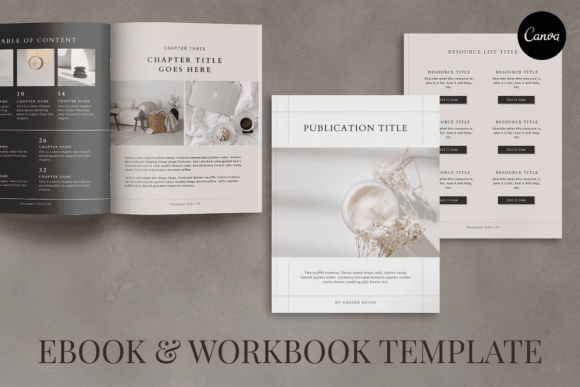
Designing with Confidence: The Harper Ebook and Workbook Template
There is a distinct moment in any creator's workflow where the blank page becomes the enemy. You have the expertise, the content, and the strategy, but the visual execution remains a hurdle. For entrepreneurs, marketers, and content creators, the gap between a rough draft and a professional publication often determines whether an audience takes you seriously. This is where the Harper Ebook and Workbook Template enters the conversation, not as a shortcut, but as a strategic design asset built for Canva.
The Harper template is a comprehensive 48-page layout system designed to handle the heavy lifting of editorial design. It is fully customizable within Canva, meaning you can adjust every font, color palette, and image to align with your specific brand identity. Unlike rigid PDF templates that require advanced software like InDesign to modify, this design asset is built for accessibility. Whether you are working in US Letter or A4 size, the structure is already optimized for readability and visual flow, allowing you to focus on your message rather than wrestling with margins and alignment.
The Anatomy of a Polished Digital Product
What makes a premium font or template stand out is rarely just one element; it is the cohesion of the whole. The Harper Ebook and Workbook Template offers a specific personality—modern, clean, and organized. It strikes a balance between minimalism and functionality, creating a visual hierarchy that guides the reader's eye naturally from the table of contents to the final call to action.
The package includes a variety of page types that are essential for a complete brand identity package. You are not just getting generic text pages; you are getting a curated set of layouts:
- 4 Cover Pages: First impressions matter in web design and digital publishing. These provide multiple options to hook your audience immediately.
- Chapter Introductions: Breaking up content is vital for retention. These pages act as visual breathers, signaling a shift in topic.
- Content Templates: With 11 distinct content page templates, you can vary your layouts to prevent visual fatigue. This is crucial for long-form editorial design.
- Gallery and Service Pages: For graphic designers and photographers, the gallery pages allow for image-heavy storytelling. The service and pricing sheets are structured to convert interest into action.
- Resource and Testimonial Pages: These add credibility. A well-placed testimonial or a curated list of resources positions you as an authority in your niche.
The visual style of Harper leans into modern typography. It utilizes whitespace effectively, ensuring that even dense information feels approachable. It avoids the clutter that plagues many DIY designs, favoring a sophisticated layout that respects the reader's time and attention.
Strategic Applications: From Branding to Marketing
Understanding the utility of the Harper Ebook and Workbook Template requires looking at it through the lens of practical application. This is not just a document; it is a versatile tool for marketing and branding.
Lead Magnets and List Building
For entrepreneurs and marketers, an ebook is often the primary asset used to build an email list. A poorly designed PDF can lead to low conversion rates because it signals a lack of professionalism. By using Harper, you present a professional publication that promises value before the reader even opens the file. The included "About" and "Introduction" pages are perfect for establishing your unique value proposition right from the start.
Courses and Workbooks
Because the template includes workbook-style layouts, it is ideal for content creators and educators. You can create fillable guides or workbooks that accompany a course. The layout supports interaction, with ample space for prompts, checklists, and notes. This turns a passive reading experience into an active learning tool.
Client Pitches and Proposals
Small business owners and freelancers often struggle with creating proposals that look as good as the work they produce. The pricing sheets and case study pages in the Harper template provide a structured framework for pitching services. It elevates a standard proposal into a premium presentation, reinforcing your brand identity at every touchpoint.
Customization: Making the Template Your Own
While the structure of the Harper Ebook and Workbook Template is fixed, the aesthetic is entirely fluid. Canva’s interface allows for deep customization, enabling you to align the template with your specific visual language.
Typography and Fonts
Typography is the voice of your design. While Harper comes with a suggested style, you should feel empowered to experiment with font pairing. A common strategy is to pair a bold display font for headings with a highly legible sans serif font for body text. If your brand leans more traditional or luxurious, swapping the body text for a classic serif font can change the entire mood of the document. For a personal touch, particularly in workbooks or creative guides, incorporating a subtle script font or handwritten font for accents can add warmth without sacrificing professionalism.
Color and Imagery
The color palette should reflect your brand identity. If you are in the wellness or lifestyle space, soft pastels and natural photography work well. For tech startups or corporate consultants, high-contrast colors and geometric imagery might be more appropriate. The template is designed to accommodate high-resolution images, making the gallery pages pop. Ensure that your images are consistent in style—whether that means using a specific filter or sticking to a particular illustration style—to maintain a cohesive brand identity.
Practical Considerations for Designers and Creators
When integrating the Harper Ebook and Workbook Template into your workflow, there are a few practical factors to keep in mind to ensure the final product is polished.
- Readability First: While creative fonts look beautiful, prioritize readability for body copy. A modern typography setup should use a font size that is comfortable for screen reading, typically between 11pt and 13pt for body text.
- Visual Hierarchy: Use the headers and subheaders provided in the template to break up text. This helps scanners grasp the main points of your content quickly. Strong visual hierarchy is the difference between a document that gets read and one that gets archived.
- Commercial Use: As a commercial font and template resource, Harper is designed for business use. Whether you are creating social media graphics to promote the ebook or the ebook itself, you have the flexibility to use the final product for commercial gain. Always double-check the licensing if you plan to resell the raw template files, but for end-products, you are covered.
- Testing Across Devices: Since this is a digital product, view your PDF on a desktop, a tablet, and a mobile phone before launching. Ensure that the text remains legible and the layout doesn't break on smaller screens.
The Harper Ebook and Workbook Template is more than just a collection of pages; it is a framework for professional communication. It bridges the gap between a raw idea and a polished publication, allowing designers, bloggers, and crafters